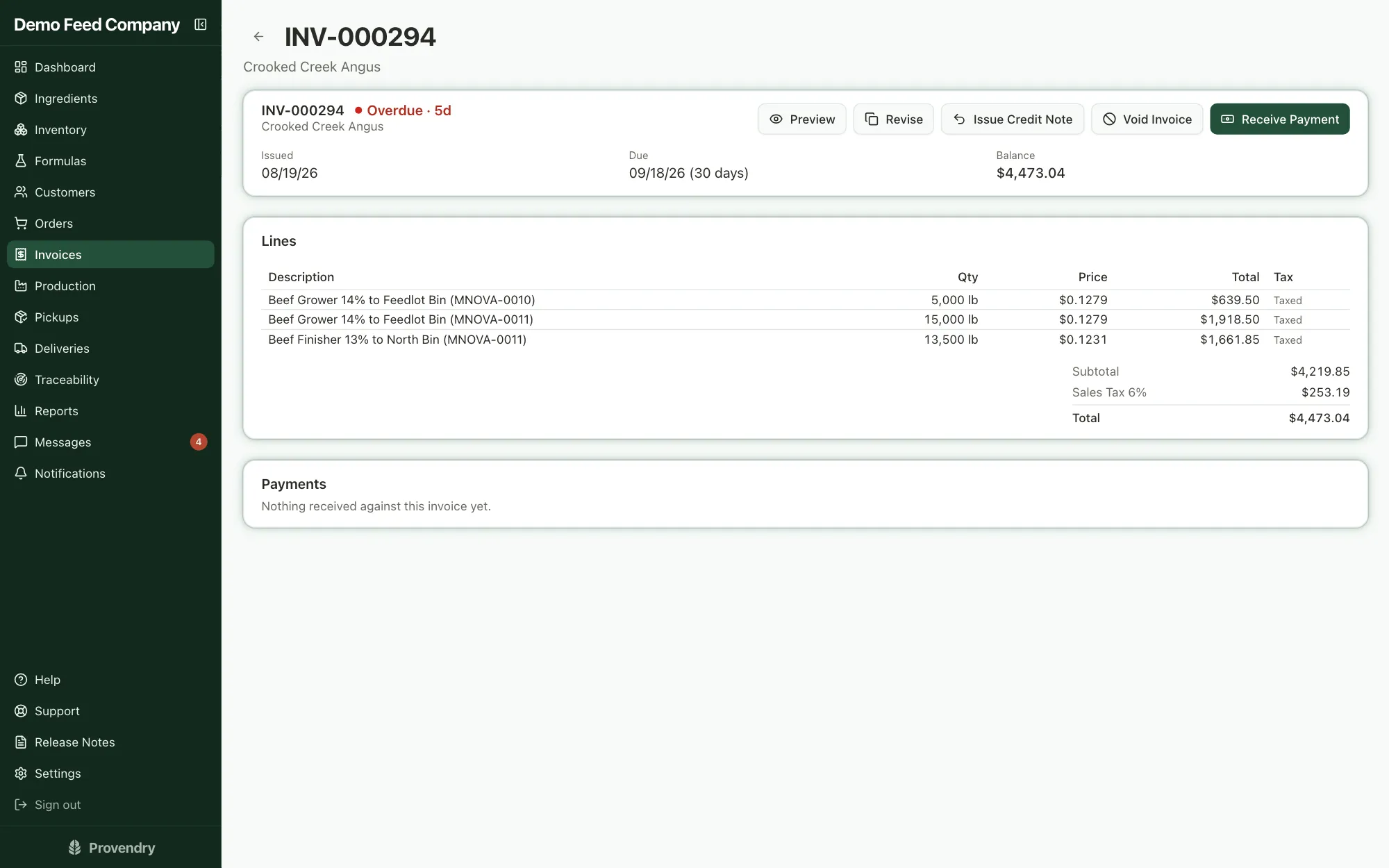
From delivered load to invoice
The order already knows the customer, the feed, the weight and the price, so nobody types an invoice. Delivered loads roll onto invoices one of two ways: automatically, by each customer's own billing rule, or in a month-end run that invoices every customer at once. Tick several orders and they go on one invoice.
Invoices go out by email with the PDF attached and a link the customer can open online without an account. Replies come to your office, not to us. Prices are locked in when the order is taken, so a later cost change never rewrites an invoice, and every invoice line carries the lot code of the feed it bills.
Feed priced by the bag reads as bags on the invoice ("3 Sacks @ $95.00"), not as a per-pound rate the customer needs a calculator to check. Freight from an outside hauler is priced into the load. A farm that keeps its own grain in your grain bank sees that grain credited on its own line, so the invoice shows exactly what they're paying you for.
Feed mill software that syncs with QuickBooks
Provendry is not a general ledger, and it doesn't try to replace your accountant's books. It feeds QuickBooks. Connect QuickBooks Online and customers, invoices, credit notes and payments go across on their own, so nothing is typed twice.
- You choose who bills the farms: QuickBooks, with its own Pay button, or Provendry, with QuickBooks keeping a copy for your bookkeeper
- Your existing QuickBooks customers and unpaid balances come over without duplicates
- Nothing syncs until you switch it on
- On QuickBooks Desktop, export your invoices to a file and import them
Getting paid, at the office, online or at the farm
Take one payment across several invoices and it's applied oldest first; anything over sits on the customer's account to use later. Customers can also pay a sent invoice online by card or bank transfer. The money goes straight to your own Stripe account. Turning that on is a one-time $49.99 USD setup (free for mills in Canada), and after that Provendry adds no fee and takes no cut of any payment; Stripe charges its standard processing fees.
Drivers can take cash or a check at the farm and record it on the delivery. It waits as collected until the office confirms it onto the customer's account, so nothing a driver takes in goes missing between the truck and the books.
Customers you invite to their own online account can see their invoices and balance, and where today's order is, without calling the office to ask. They only ever see their own account.
Credits, revisions and voids done properly
Mistakes on an invoice happen. What matters is that fixing one leaves a clean trail.
- Revise a sent invoice and it keeps its number
- Issue a credit note instead of editing history
- Void an invoice with a reason, and any payment on it goes back to the customer's account
- When an order grows after it was billed, invoice just the difference
- Volume discounts show as their own line, so the customer sees the full price and what they saved
Sales tax, GST/HST and Canadian dollars
Set your tax rates once and every invoice works out the tax. Mark a whole customer as tax-exempt, or just one line on an invoice. Canadian mills invoice in Canadian dollars, with GST/HST and your registration number printed on the invoice.
Statements, money owed and margin reports
Monthly statements go out from the same place, and money owed is split by age: current, 1-30, 31-60, 61-90 and over 90 days. Each customer's page shows their balance, invoices, payments and order history together.
Because the invoices come from real orders and the orders carry what each load cost to make, the reports are your own numbers: profit and margin for every formula and every customer, revenue and volume by month, and for US mills, state tonnage reports worked out from delivered loads. The formulas behind those costs are on the least-cost formulation page, and the tags that ship with each load on feed tags.
Every invoicing and payments feature
Questions mills ask
- Does Provendry replace QuickBooks?
- No. Provendry runs the mill side: orders, invoices, payments and statements. It isn't a general ledger. Connect QuickBooks Online and customers, invoices, credit notes and payments go across on their own, so your bookkeeper keeps working in QuickBooks.
- Which versions of QuickBooks does it work with?
- QuickBooks Online syncs automatically. QuickBooks Desktop doesn't have a live connection; export your invoices to a file and import them.
- Can my customers pay online, and what does it cost?
- Yes, by card or bank transfer, into your own Stripe account. It's a one-time $49.99 USD setup (free for mills in Canada), then no fee from Provendry on any payment. Stripe charges its standard processing fees. Pricing has the rest.
- Can drivers collect payment on delivery?
- Yes. The driver records cash or a check on the delivery, and it waits until the office confirms it onto the customer's account. Drivers are asked before marking a load delivered when money is owing on it.
- Does it handle sales tax and GST/HST?
- Yes. Set your rates once, and mark customers or individual invoice lines as tax-exempt. Canadian accounts invoice in Canadian dollars and show GST/HST with your registration number.